The evolution of Keyword-Cluster as a timeline — every release by version, newest first. New features, improvements, and fixes, transparently documented.
v0.10.0June 14, 2026Current
Version 0.10. AI search now fully in view.
This is the release we’ve been working toward. With Google AI Mode and the AI Overviews, all relevant AI systems are now directly integrated — alongside ChatGPT and Gemini. That means we capture over 95% of relevant traffic in one place. You switch straight through every single answer and see at a glance how differently the systems respond.
4 new featuresMarket coverage > 95%~5 min read
01
AI Mode & AI Overviews NEW
All AI systems in one place: over 95% coverage.
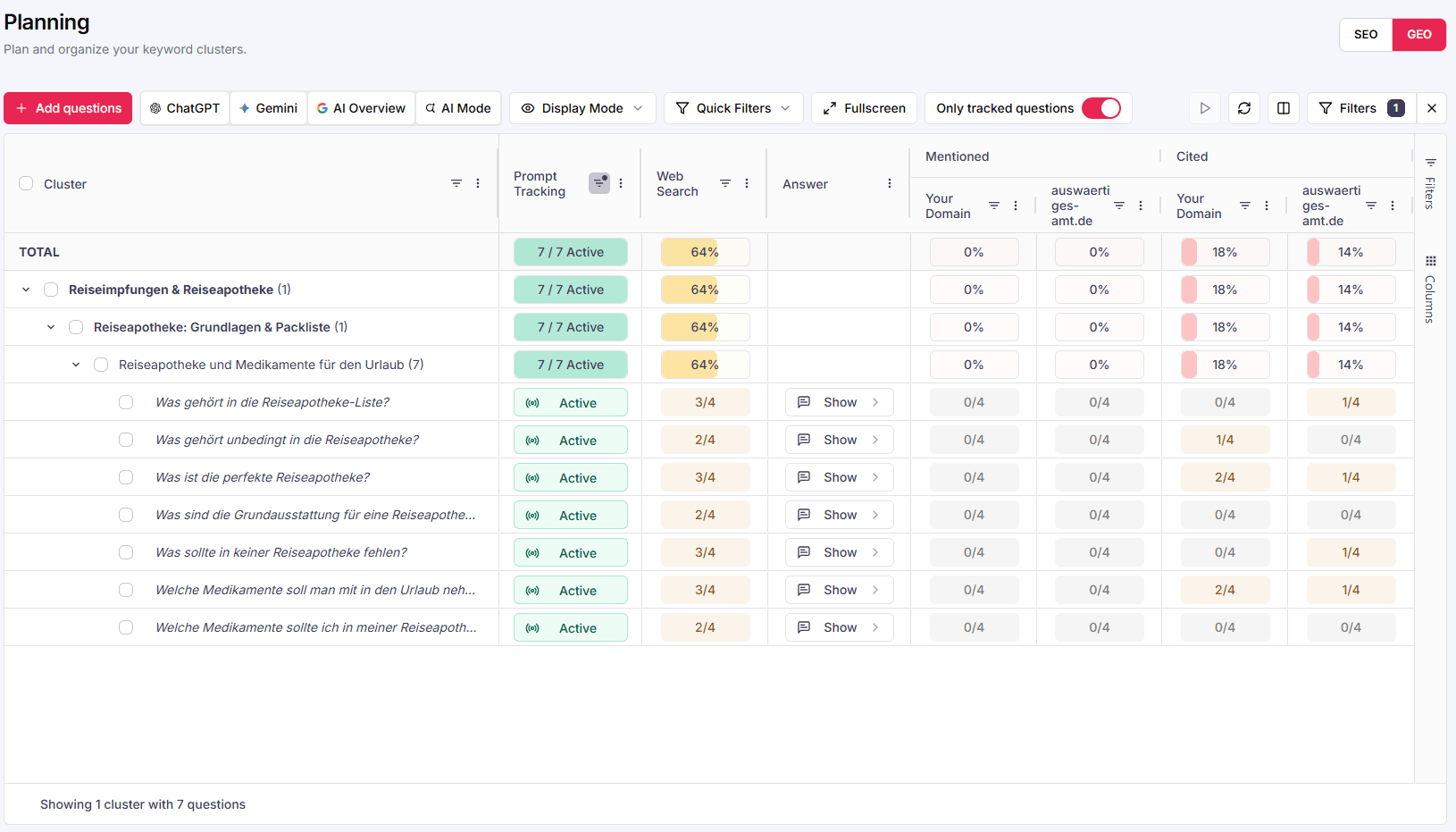
With v0.10, Google AI Mode and the AI Overviews are fully integrated. Together with ChatGPT and Gemini, you now track all four relevant answer systems bundled in the Planning view — per prompt, per cluster. That covers over 95% of relevant traffic.
app.keyword-cluster.de › Planning (GEO) › ChatGPT · Gemini · AI Overview · AI Mode
NEWAll 4 AI systems
Complete coverage: ChatGPT, Gemini, AI Overview and AI Mode now come together in one view — over 95% of the relevant market.
One data basis: Mentioned and Cited values per domain — directly comparable across all systems.
No more blind spots: Where individual engines used to be missing, you now have the full picture of generative search.
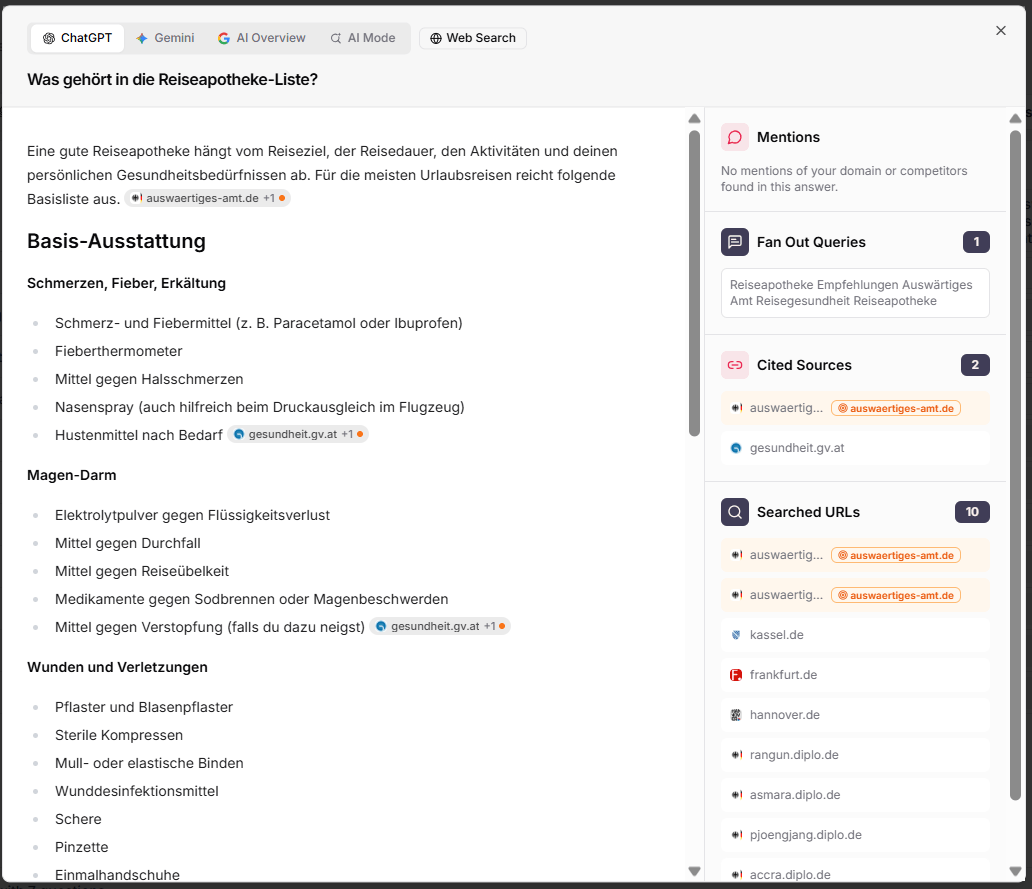
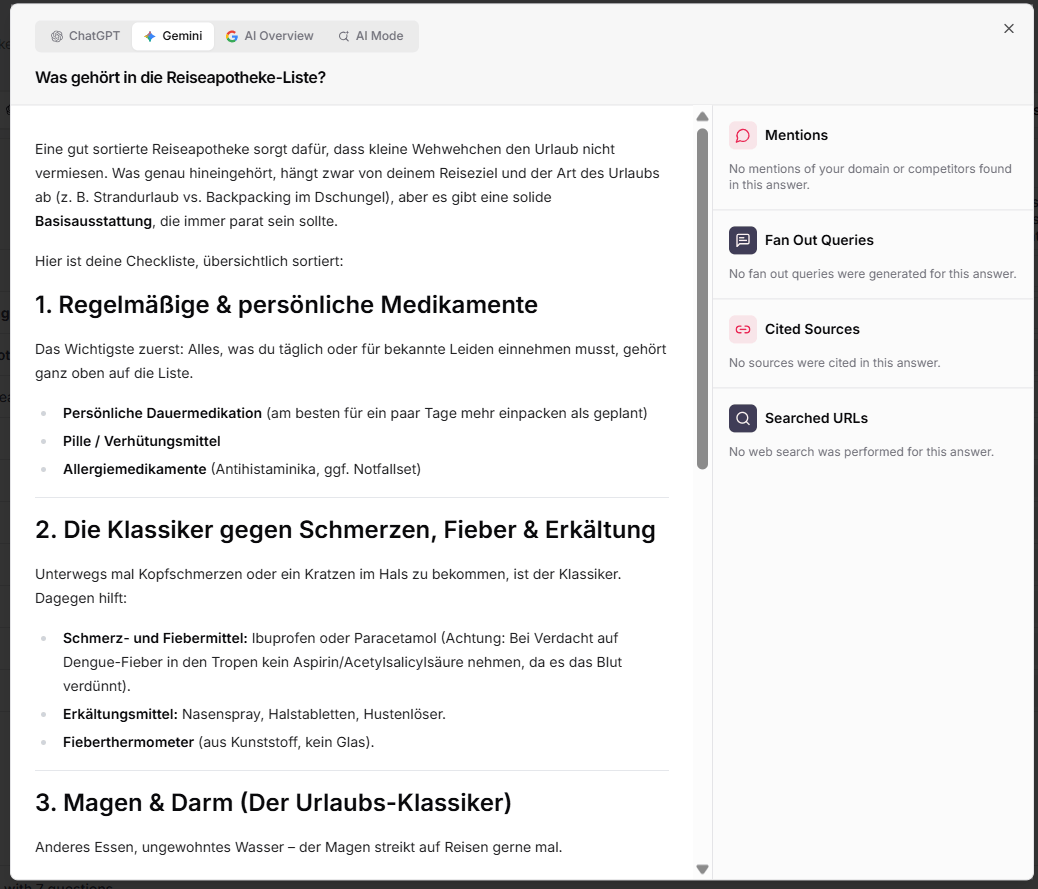
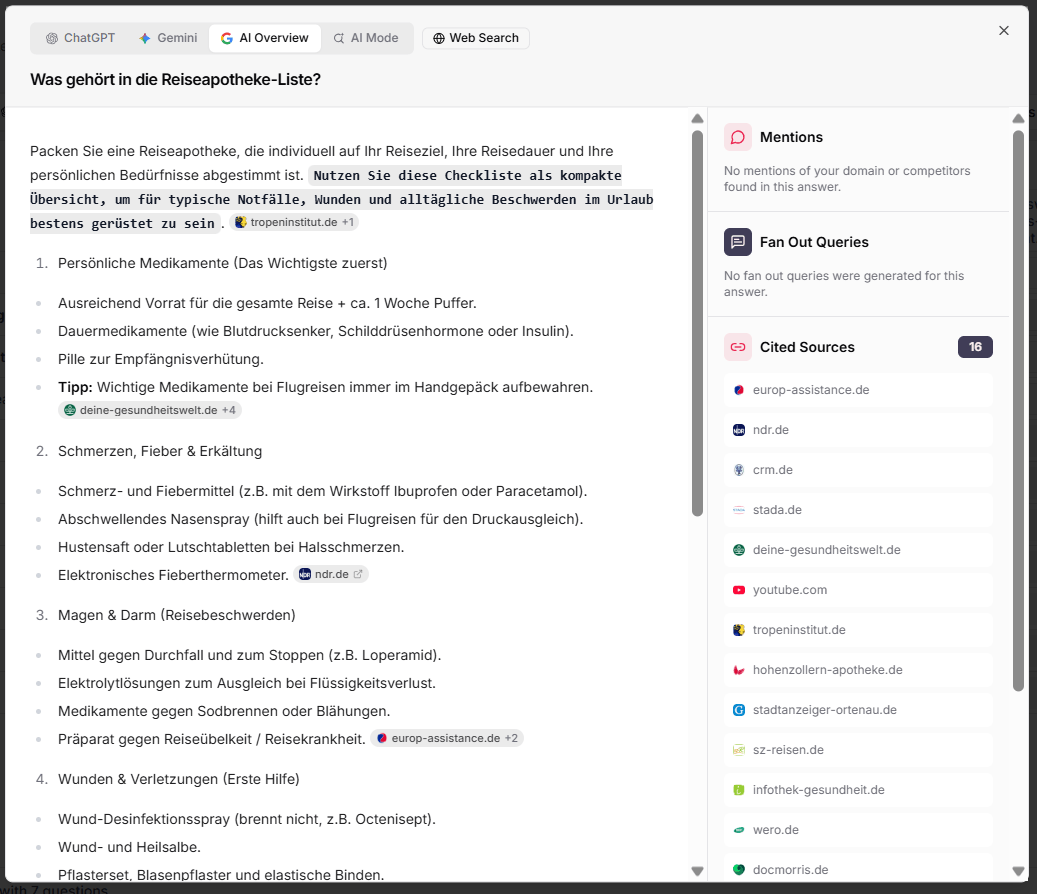
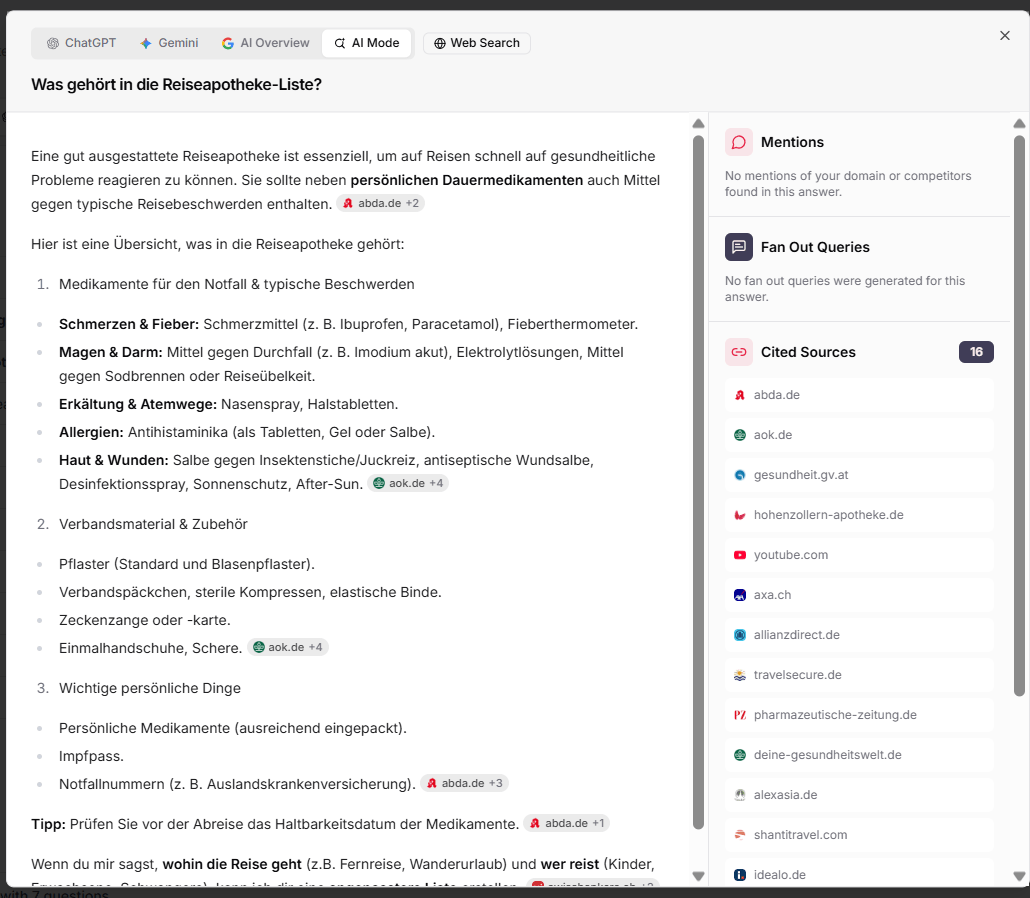
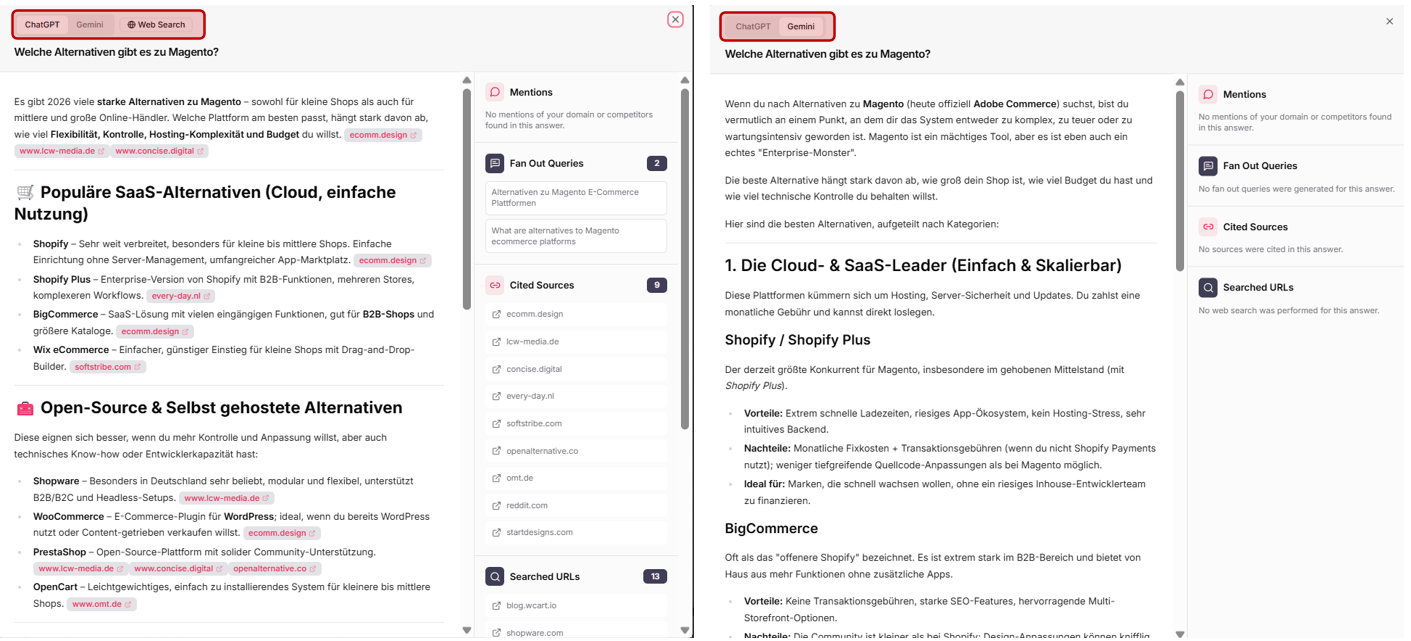
And you can switch straight through all answers. The same question — “What belongs in a travel first-aid kit?” — turns out completely differently depending on the system: different structure, different sources, different priorities. So you can tell at an aggregated glance where you’re visible in which system.
ChatGPT2 sources cited
Geminino sources
AI Overview16 sources cited
AI Mode16 sources cited
Why it matters
Every system draws on different sources and weights them differently. If you watch just one engine, you only see a fraction. By switching through them directly, you understand which content you still need to optimize for which system.
02
Market Dashboard NEW
More AI data, more market relevance.
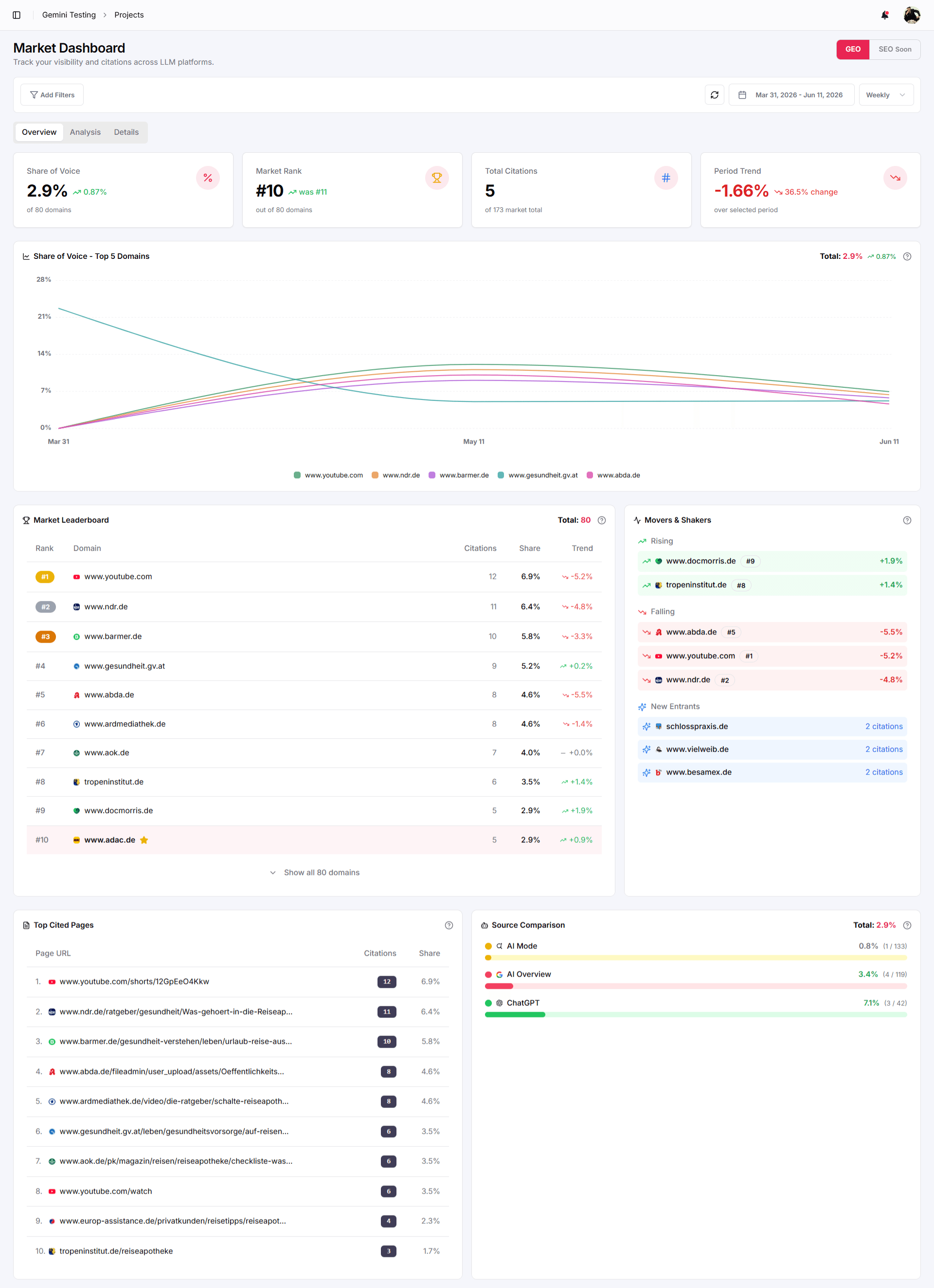
Thanks to the additional AI systems, significantly more data now flows into your Market Overview dashboard. The result: a more complete picture of the market — and with it more substance to identify new partners for PR, long-term advertorials and collaborations.
Denser market picture: More cited domains, more sources, more data points — the leaderboard becomes more representative of your real competition.
Partner radar: Use “Movers & Shakers” and “Top Cited Pages” to spot which domains are gaining visibility in AI search — ideal candidates for PR & collaborations.
Source comparison: The “Source Comparison” shows which system (AI Mode, AI Overview, ChatGPT) you’re cited through proportionally.
03
Prompt-Level Tags NEW
Tags now per individual prompt.
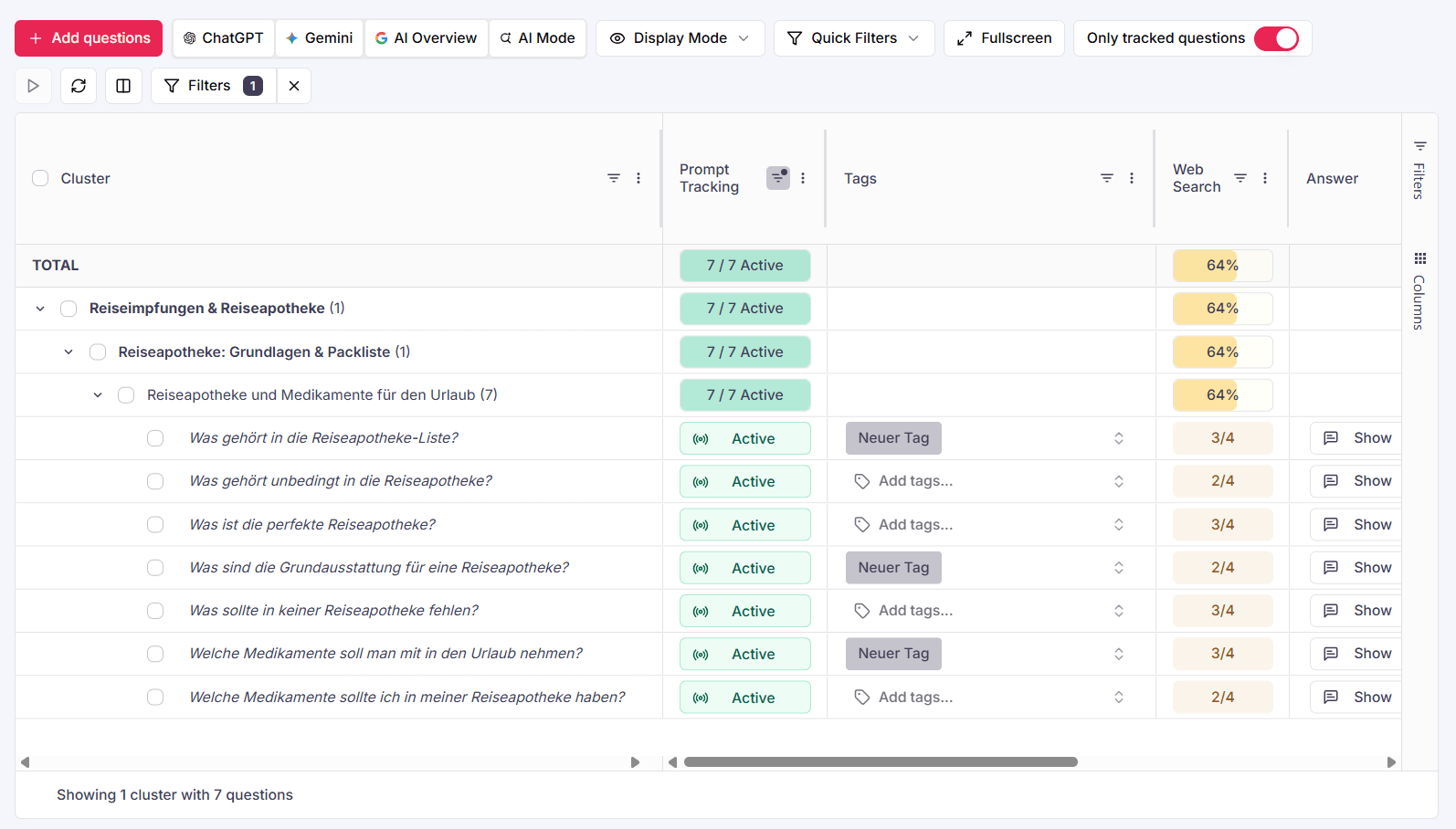
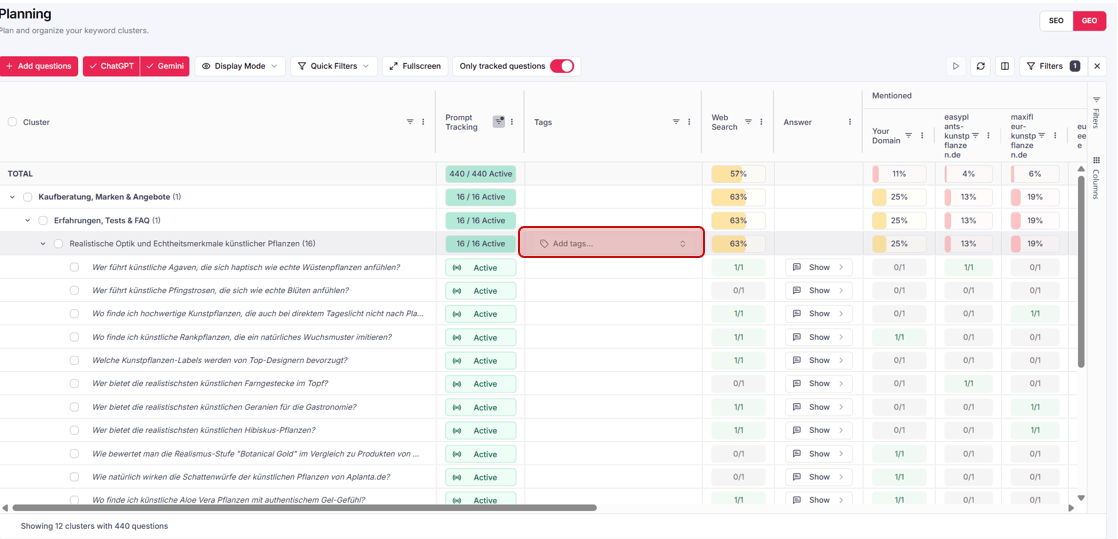
In the GEO area you now assign tags directly at the prompt level — no longer only at the cluster level. This lets you label individual prompts that, for example, contain specific brands, and makes later filtering much easier.
Planning (GEO)→“Tags” column→Add tags…
app.keyword-cluster.de › Planning (GEO) › Tags per prompt
Granular instead of coarse: Tag individual brand-related or thematic prompts deliberately — independent of their cluster.
Easier filtering: Then filter your monitoring exactly to the tagged prompts — e.g. all brand questions at a glance.
Clean segments: Combine cluster and prompt tags into precise reporting sets tailored to your business.
04
AI Coverage in the SEO tab NEW
AI Overviews now in the SEO tab too.
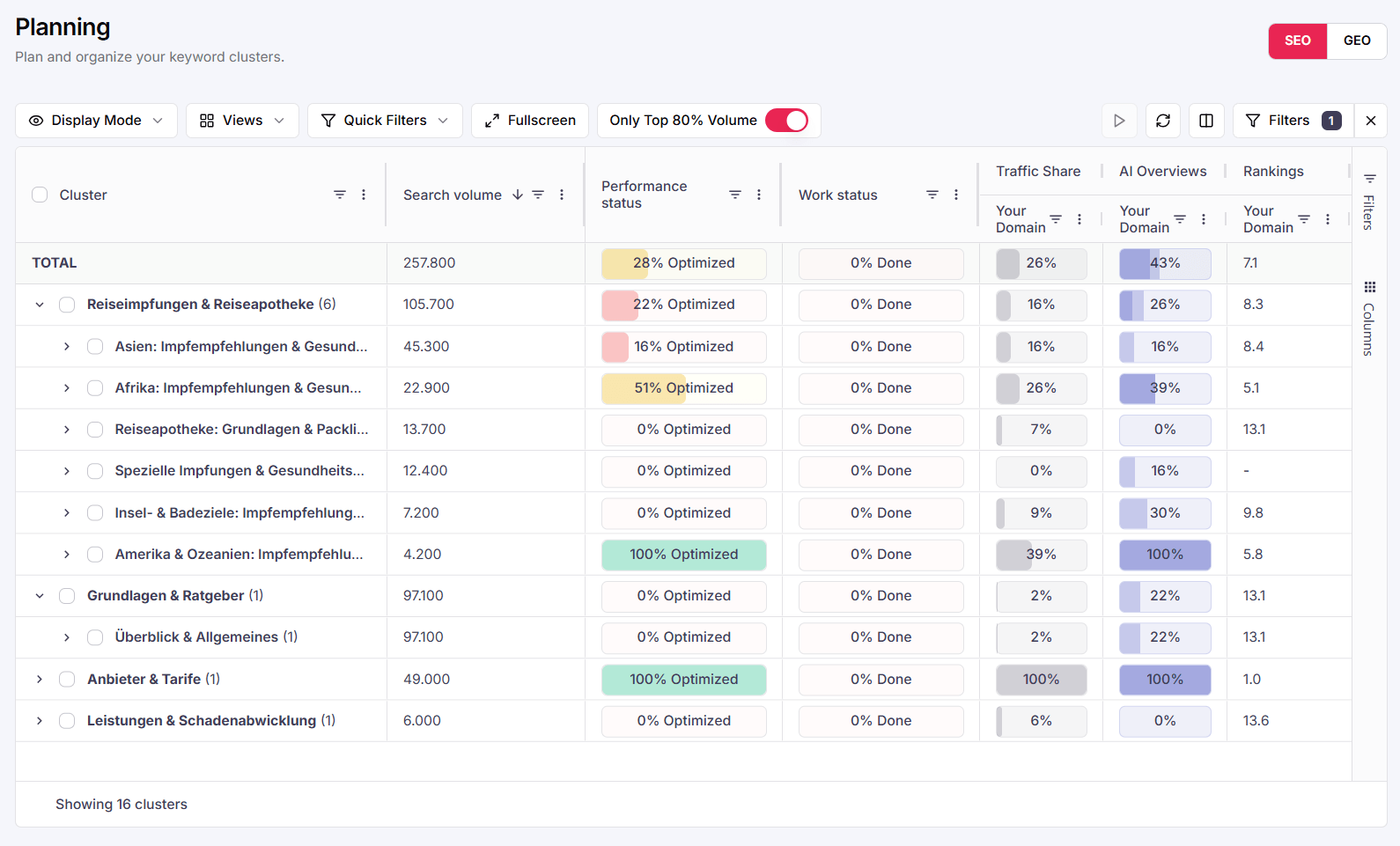
Previously the SEO tab showed you with Traffic Share how much search-volume traffic your domain wins per cluster. From now on, the new metric AIO Coverage sits right next to it — your visibility in Google’s AI Overviews, summarized in a single score.
Google distinguishes two kinds of sources: Main Rankings, which appear prominently as soon as an AI Overview is shown — and Detail Rankings, which only become visible once you expand all sources. We bundle both into a weighted score, so you grasp depth and prominence at a glance, without having to read two columns.
SEO tab→Traffic Share+AIO Coverage
app.keyword-cluster.de › Planning (SEO) › Traffic Share · AI Overviews
NEWAIO Coverage
One score, both levels: Main and Detail coverage flow together in a weighted way — prominent placements count more.
Instantly readable: The stacked bar shows you at a glance how much of your visibility comes from prominent main sources and how much from the depth.
Consistent logic: Built like the familiar Traffic Share bar — same reading, no new learning curve.
The roadmap · What’s coming next
From complete coverage to your proactive early-warning system.
With v0.10 the coverage is complete. Now we’re making the data even more actionable — so that Keyword-Cluster doesn’t just inform you, but actively warns you before market share tips over.
Historical answer view: track changes over timeComprehensive prompt management: add, delete & recategorizeAutomated tagging rulesPrompt prioritization by business impactSmart alerting for visibility drops
Full changelog · v0.10.0
NEWGoogle AI Mode & AI Overviews integrated — market coverage over 95%.
NEWSwitch directly through all answers (ChatGPT, Gemini, AI Overview, AI Mode).
NEWMarket Dashboard with additional AI data for partner & PR research.
NEWTags now at prompt level in the GEO area (e.g. for brands).
NEWAI Coverage in the SEO tab — AI Overview coverage next to Traffic Share.
IMPMentioned & Cited values unified across all engines.
FIXMore stable source attribution for answers with many cited domains.
v0.9.0June 8, 2026
The Multi-Engine & Tagging Release. v0.9 is live.
The search of tomorrow happens across many platforms at once. With version 0.9 we close the gap between classic SEO and modern AI search almost completely. We give you the tools to not only measure your visibility across all major platforms, but to strategically steer it through intelligent tagging.
4 new featuresVisibility raised to ~90%~5 min read
01
Gemini Integration NEW
The evolution of AI search: Google Gemini is here.
Google Gemini is now fully integrated into the app and selectable for all projects. Together with Google Classic, Google AI Overviews and ChatGPT, we now cover around 90% of the relevant market.
Maximum market coverage: With Gemini you close one of the most important gaps in your GEO strategy.
Prepared for “AI Mode”: We're preparing the rollout of Google AI Mode, which will raise our market coverage to over 90%.
Future-proof: Your strategy is now based on data from the world's technologically leading models.
Note · Activation at the push of a button
If you'd like to use this feature, we can enable it for you at the push of a button (provided credits are available). Just get in touch with us.
02
Custom Tagging NEW
Your own monitoring exploration through tags.
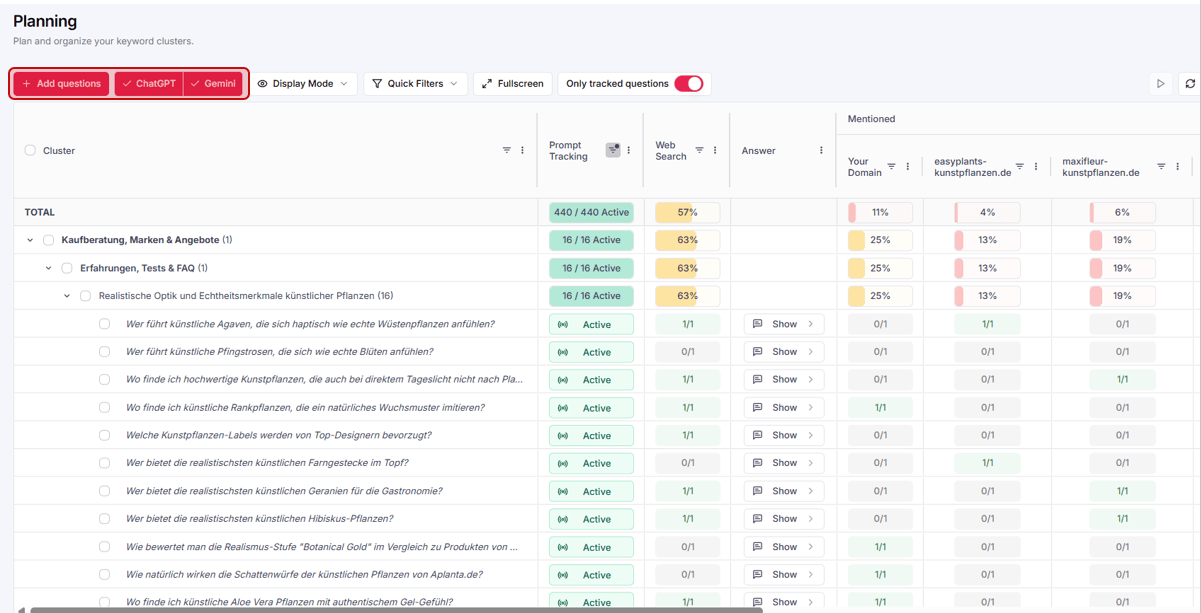
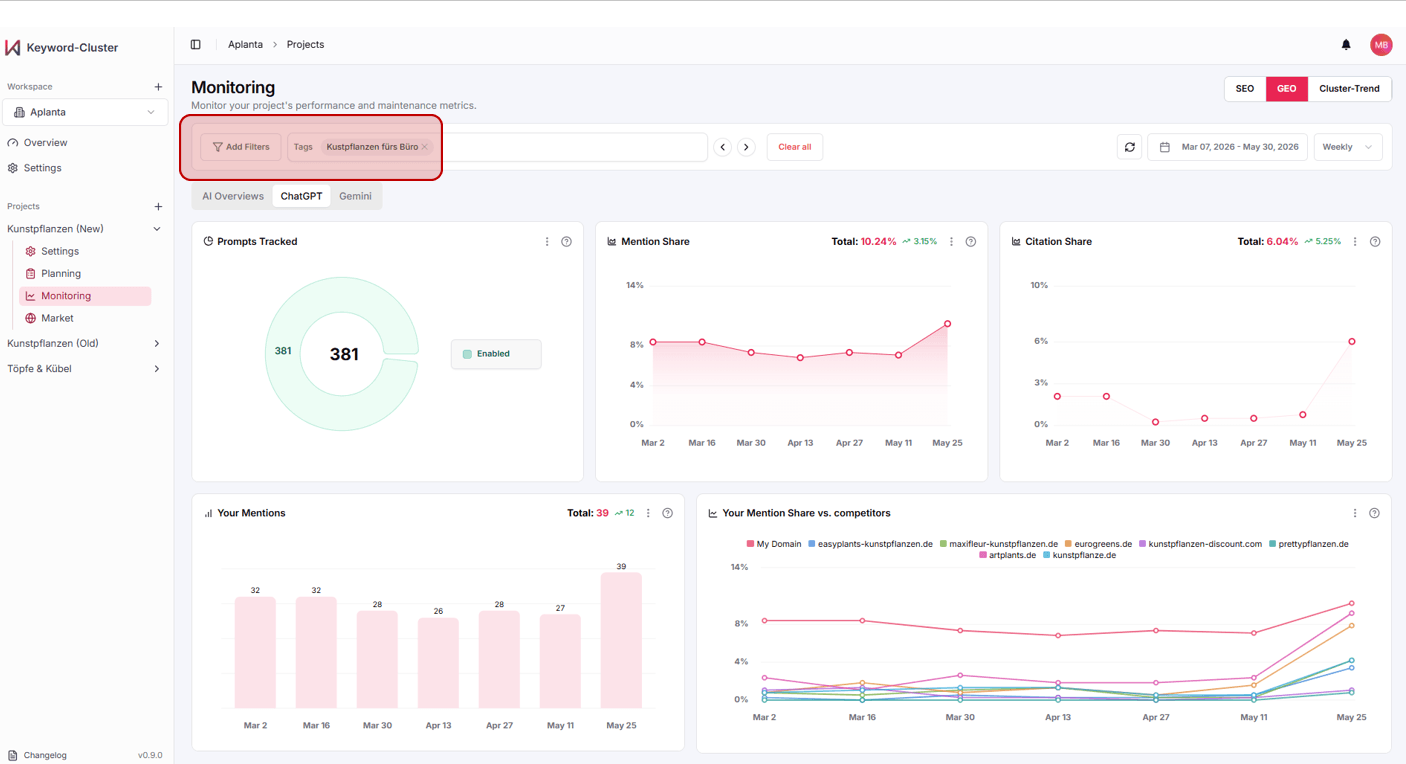
Build your own reporting structures. With the new tagging system you can group projects, keywords and prompts individually — for example by product category or focus topic.
app.keyword-cluster.de→Dashboard→Tags
app.keyword-cluster.de › Planning (GEO) › Tags
Flexible setup: Either set individual prompt clusters as tags directly, or use the filter search to specifically identify prompt clusters containing certain words and label them in bulk.
Holistic monitoring: Track the performance of specific topics across platforms with just one click.
Reporting your way: Build your dashboard exactly how your business needs it — away from standard views, toward strategic segments.
And the best part: you can now filter your GEO monitoring directly by your tags — so you see the visibility of an entire topic set at a glance.
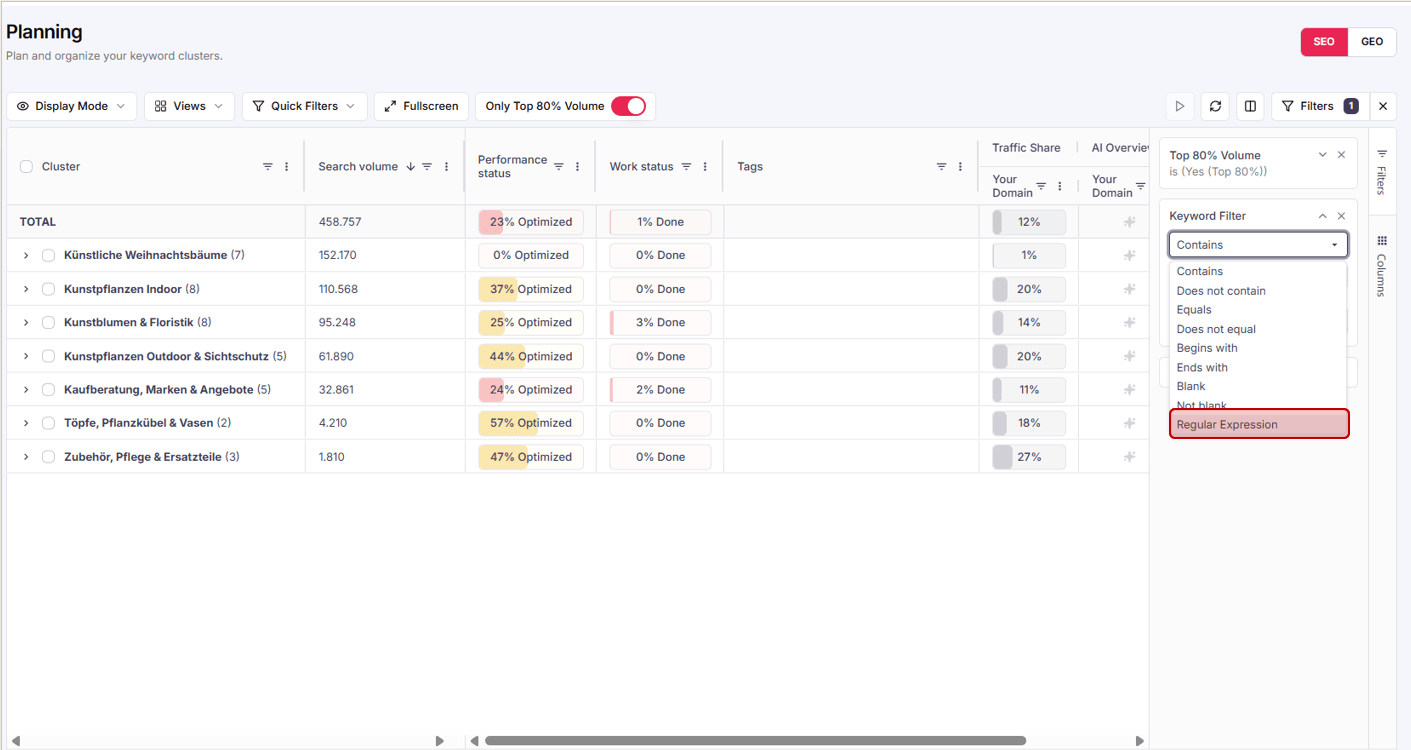
Targeted labelling: Use the filter search to identify prompt clusters containing certain words and label them efficiently with a tag.
Smart rule set: Build complex queries to instantly isolate, e.g., all clusters with specific brand names or topic worlds.
Scalability: Process thousands of data points at once with precise, pattern-based filter rules.
The roadmap · What's coming next
From a reporting tool to your proactive early-warning system.
Here's a look at our upcoming development — so that Keyword-Cluster doesn't just inform you, but actively warns you before market shares tip.
Google AI Mode integration (> 95% market coverage)Comprehensive prompt management: add, delete & recategorizeAI Overviews & ChatGPT as dedicated LLM integrations (like Gemini)Historical answer view: trace changes over timeNew AI Coverage metric in the SEO tab (search-volume coverage in the AI Overview)
Full changelog · v0.9.0
NEWGemini integration incl. activation service (market coverage ~90%).
NEWGlobal tagging system (manual per cluster or via word filter).
NEWDirect engine switch right within the prompt answer.
NEWRegEx support in the filter menu of the SEO and Geo tabs.
IMPLogical prompt-cluster assignment for more intuitive tagging.
FIXStability improvements when filtering large data sets.
v0.8.0May 11, 2026
The GEO Release. SEO meets Generative Engine Optimization.
Classic SEO is increasingly merging with GEO — Generative Engine Optimization. To stay visible in Google and in ChatGPT & co., you need clear data instead of gut feeling. This release makes steering your content strategy more precise, faster, and more user-friendly.
3 new featuresRolled out to all workspaces~4 min read
01
Brand new NEW
The AI Cluster Layer for prompts.
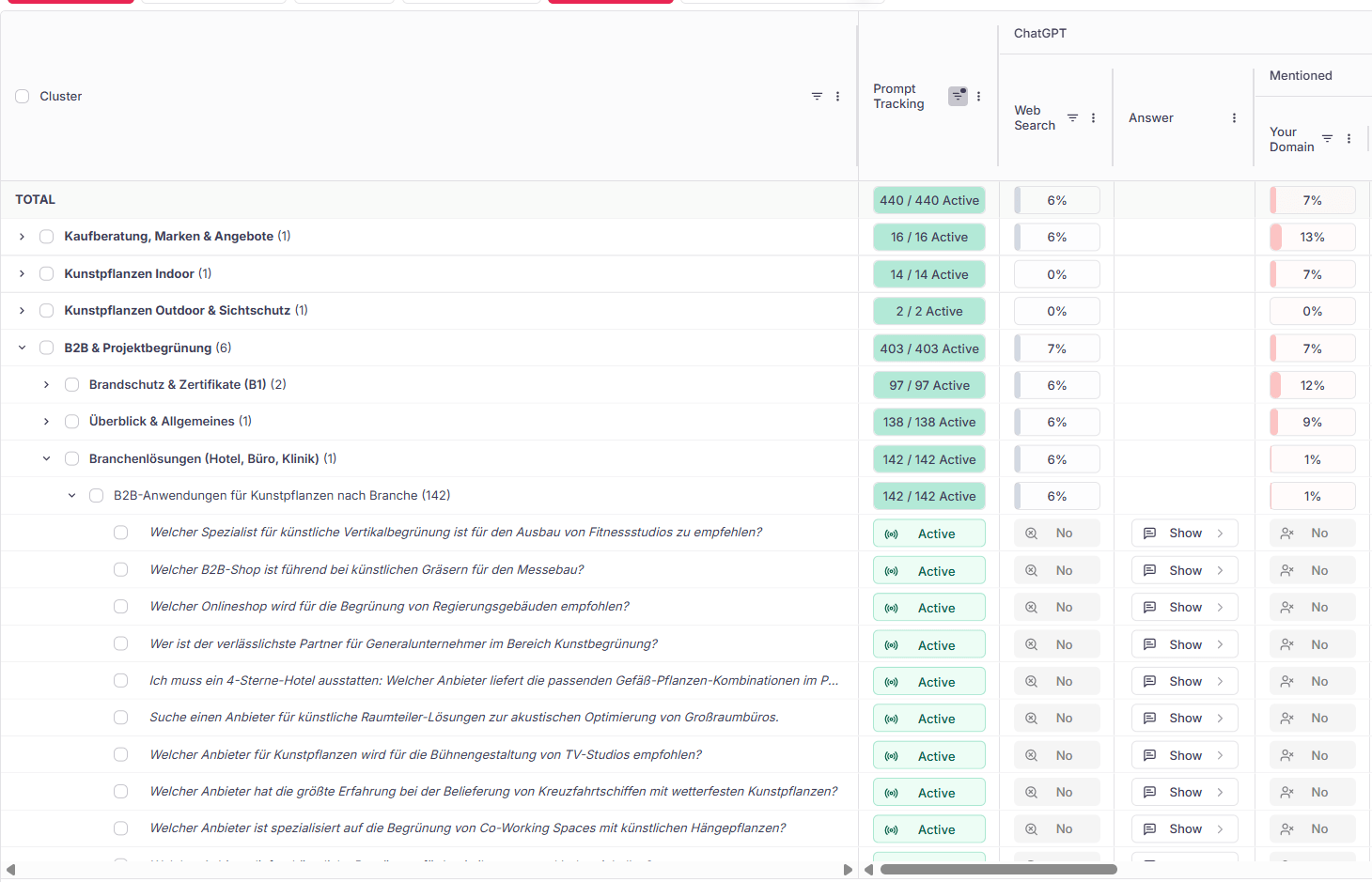
The days of endless, confusing question lists are over. We've developed a completely standalone AI clustering model built specifically for GEO prompts that bundles your prompts by topic.
app.keyword-cluster.de › Planning › Prompts
Pyramid view: Prompts are grouped into logical clusters — analogous to classic keyword clustering.
Clear structure: See at a glance in which topic areas you're currently losing market share.
Standalone model: Trained specifically for GEO prompts — no heuristics, no keyword logic transferred 1:1.
Outlook · just the first step
We'll keep expanding the Cluster Layer in upcoming releases: prompt prioritization so you can weigh impact even faster — and a brand differentiation that automatically detects brand-related questions and excludes them from the AI analysis.
02
Custom Prompts NEW
Integrate your own user questions.
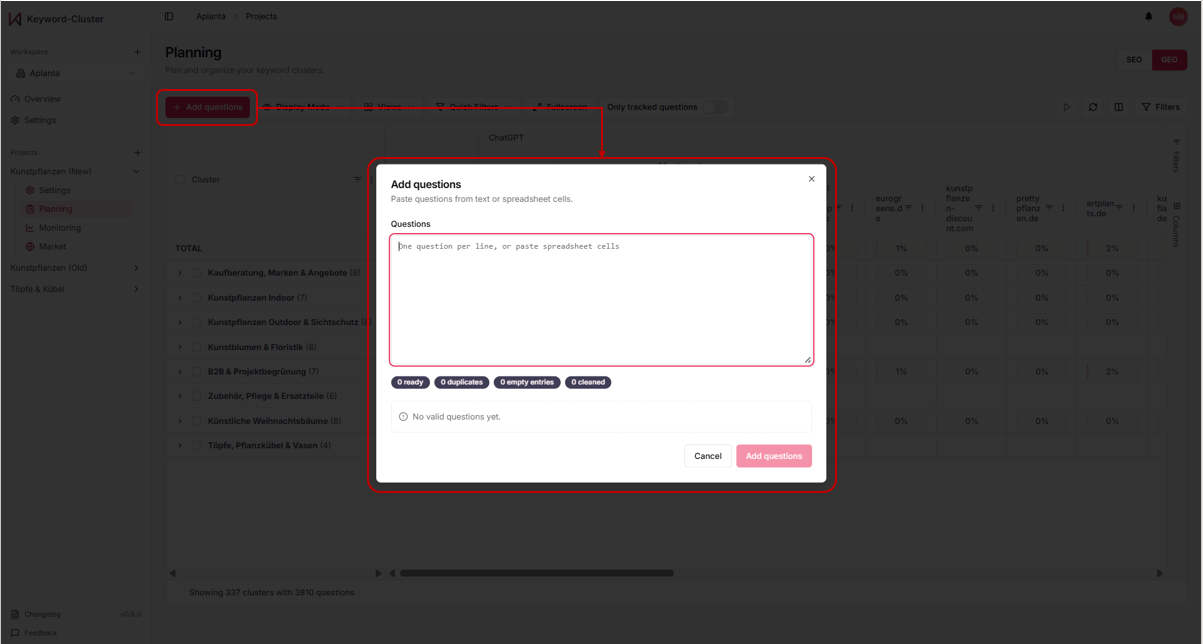
Do you have special prompts from your customer service or a new campaign? No problem. From now on you can upload your own GEO prompts independently, right in the app — via copy & paste from Excel or Google Sheets.
app.keyword-cluster.de › Planning › Add questions
Auto-cleanup: Duplicates, empty rows, and whitespace are detected automatically — you see live what's being imported.
Direct AI assignment: Your own questions are automatically routed into the matching AI clusters.
Real-time refresh: One click on Refresh — and your GEO planning is updated. No support ticket needed.
03
Smart Notifications NEW
Your real-time channel.
Stay up to date without constantly checking the tool manually. As soon as the data for your project has been updated, you'll receive an email or in-app notification if you want. Enable it per project — or disable it globally.
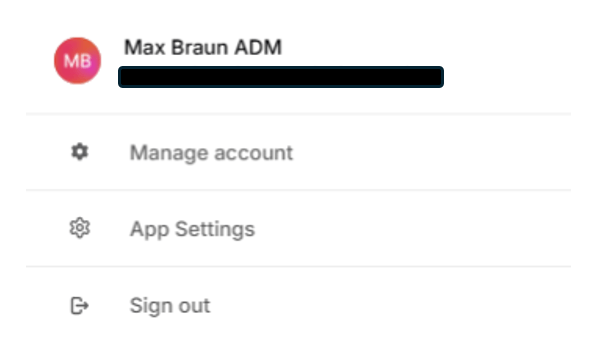
Account › App Settings
Where to find it:
Account logo→App Settings→Notifications
Toggle channels per project, per event type, and globally — exactly as you need.
The big picture behind this feature
What looks like a small update is the technological foundation for our future information architecture: automated reporting scanners, pro insights, and smart alerting.
What's coming next
From a "reporting tool" to your proactive early-warning system.
Are your market shares suddenly dropping? Are there technical analysis issues or routine warnings in the app backend (e.g. during downtimes)? In the future, we'll push essential warnings and new product releases lightning-fast and proactively — straight to you via this new system.
NEWAI Cluster Layer — standalone AI clustering model for GEO prompts.
NEWCustom prompt upload with auto-cleanup and AI cluster assignment.
NEWSmart Notifications & in-app updates per project.
IMPFaster synchronization between Planning and Monitoring views.
FIXFixes to filter persistence for cluster tables.
v0.7.0January 16, 2026
Monitoring Suite. Rankings, AI Overviews & ChatGPT in one place.
Visibility doesn't end at position 1. From v0.7 you track Google rankings, AI Overview presence and ChatGPT mentions bundled per cluster — and see at a glance where you're gaining or losing ground.
NEWAI Overview tracking: detects whether your URLs appear in Google's AI answers — per keyword cluster.
NEWChatGPT mention monitor: measures how often your brand is named in generative answers.
IMPRanking history now with a 12-month range instead of 90 days.
IMPMonitoring dashboard loads 2.4× faster on average.
FIXFixed a timezone bug in the daily ranking update.
v0.6.0December 17, 2025
Impact prioritization. Content by business impact.
Not every keyword is worth the same. v0.6 automatically prioritizes your clusters by search volume, competition and estimated business contribution — so your team tackles the right things first.
NEWImpact score: every cluster gets a prioritized rating from 0–100.
NEWRoadmap view: plan clusters by quarter and priority on a board.
IMPCluster table now sortable and filterable by impact score.
FIXFixed faulty volume aggregation for very large clusters.
v0.5.0November 20, 2025
Global Reach. 52 languages, 155 countries.
International brands now cluster multilingually. v0.5 brings language- and country-specific search data — one project, many markets, a consistent strategy.
NEWMulti-language clustering: support for 52 languages across 155 countries.
NEWMarket switcher: switch between country data sets per project.
IMPLanguage detection on keyword import is far more precise.
FIXFixed umlaut and special-character handling in CSV export.
v0.4.0September 30, 2025
Team Workspaces. Work on strategies together.
SEO is teamwork. v0.4 brings shared workspaces, roles and comments — so strategy, content and management work from the same data.
NEWWorkspaces & roles: admin, editor and viewer rights per project.
NEWComments: leave notes directly on clusters.
IMPSimplified invitation flow via email link.
v0.3.0August 3, 2025
Export & integrations. Your data, your workflow.
v0.3 opens up the platform: CSV/Excel export, Google Sheets sync and a first API bring cluster data to where your team already works.
NEWGoogle Sheets sync and CSV/Excel export for all clusters.
NEWFirst REST API (beta) for read access to projects.
FIXStabilized export encoding for large files.
v0.2.0March 10, 2025
The Dashboard. Clusters made visible.
v0.2 turns raw keyword lists into an interactive cluster visualization — with search, filter and detail views for every topic area.
NEWCluster dashboard with interactive topic overview.
NEWFull-text search and filters across all keywords.
IMPOnboarding with a guided first project.
v0.1.0January 17, 2025
The beginning. The first clustering engine.
Where it all began: v0.1 brings the first version of our ML-based keyword clustering engine — thousands of keywords become clean topic clusters in minutes.
NEWML clustering engine: automatic grouping of keywords by semantic proximity.
NEWKeyword import via copy & paste and CSV.
NEWFirst closed beta for selected Content Fleet customers.